 Coming soon to Google Play
Sketchlight
Trace any picture onto real paper, step by step.
Pick a drawing or your own photo. Sketchlight shows it over your paper, big shapes first and details last. Lock it, and trace it by hand.
For Android phones and tablets, Android 8.0 and later. In English, German, Spanish, Brazilian Portuguese, French, Italian, Turkish and Indonesian.
Steps
Big shapes first, details last
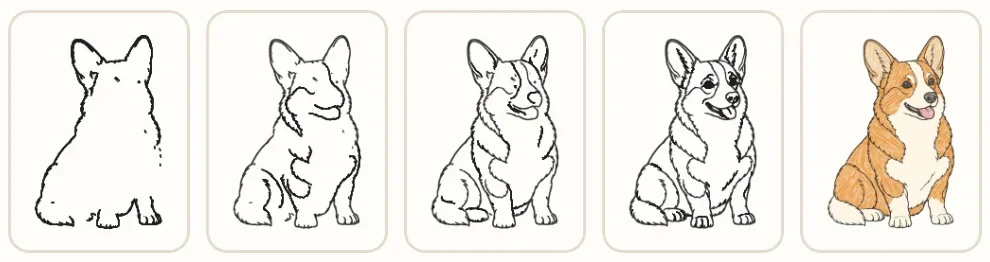
With Steps you see a drawing in the order an artist draws it. The lines to draw now are red; everything you’ve already drawn fades back. When you finish, try the same drawing again with less help.
How it works
Paper, a pencil and your phone
Choose a picture
A drawing from the Library, your own photo, or words you type, such as a name.
Set it up
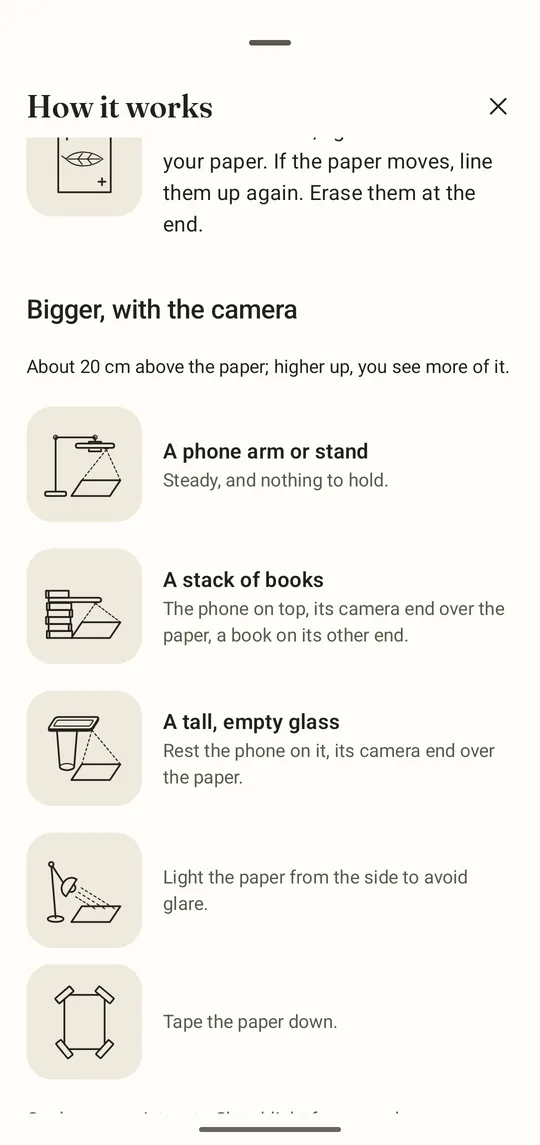
Lightbox: lay thin paper on your screen. Camera: rest your phone on a tall glass or a stack of books above the paper.
Lock it and trace
A touch can’t move the picture while it’s locked. Move through the steps with the volume keys. After a break, you pick up exactly where you left off, still locked.
Inside
What you can draw
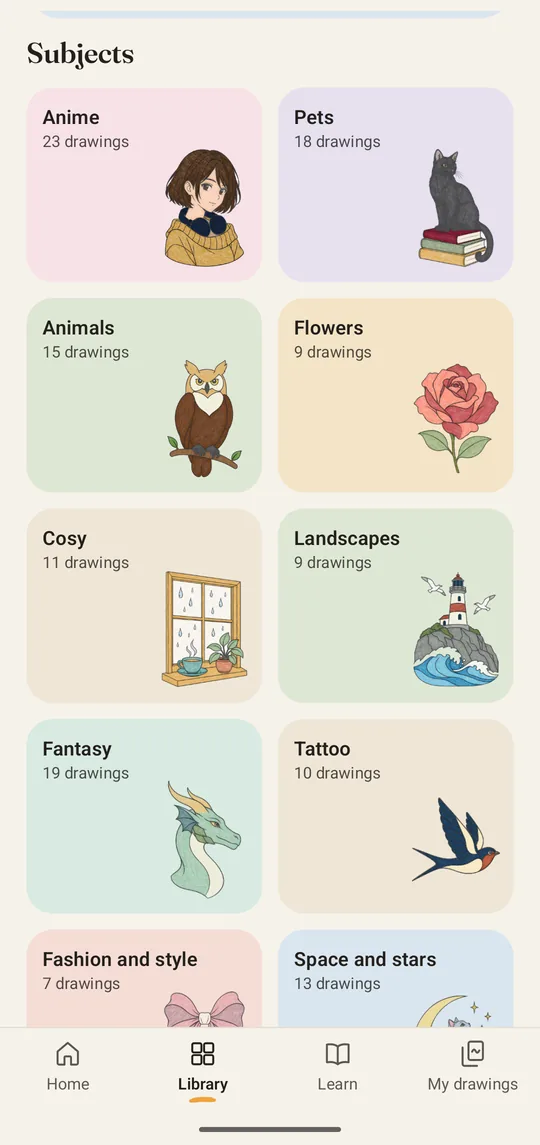
A Library of 285 drawings
22 collections: anime, animals, pets, fantasy, tattoo flash, zodiac signs, birth flowers, mandalas, cosy scenes, landscapes, classics and more. Four levels, from about five minutes to over an hour.
Your own photos
Sketchlight makes lines and steps from your photo, on your phone. Tracing your photos is free, with Steps on your first photo.
Words
Type a name or a quote and trace it in beautiful lettering.
9 drawing courses
47 lessons, from first lines to faces: guides first, then the lines, then shading.
The lock
Opacity, Peek, Grid and Mirror help you see what you’re drawing, and a touch or the back gesture can’t move the picture.
Timelapse and the Reveal
In Camera mode, Sketchlight can record your drawing. At the end, the picture fades away until only your drawing is left.
About our pictures: the Library’s illustrations are original works made with AI assistance. The Classics are drawn after public-domain works.
Free and Studio
Free to start. One payment for everything.
Free
- The whole tracing tool, with the lock
- Unlimited tracing of your own photos, with Steps on your first photo
- 106 drawings with Steps
- The Foundations course and the first lesson of every course
- Today’s sheet
Sketchlight Studio
one optional purchase in the app
- The other 179 drawings, step by step, most with shading
- Every lesson of the nine courses
- Your own photos step by step, with shading
- Timelapses without the Sketchlight watermark
- Fine-tuning for your photo’s lines
Google Play shows you the price before you buy.
No subscription. No ads. No account.
Privacy
Your photos stay on your phone
Sketchlight works offline and needs no account. Your pictures, drawings and videos stay on your device unless you share them. Our own code collects nothing; Google’s billing library for the Studio purchase sends its own diagnostic data to Google.
Help
Questions and answers
I bought Studio, but it is still locked.
Make sure you’re online and signed in to Google Play with the account you bought it with. Then open Settings in Sketchlight and tap Restore purchase. If Sketchlight says “No purchase found for this Google account”, check which account Google Play is using. If the payment is still pending, Studio unlocks once Google Play confirms it. If it still doesn’t work, write to us. Please include the order number from Google Play’s receipt email; it starts with GPA.
I bought Studio. How do I get it on a new phone?
Sign in to Google Play with the same Google account, open Settings in Sketchlight and tap Restore purchase. Your drawings don’t move with it: Sketchlight keeps them only on your old phone, and Android doesn’t back them up. When you finish a drawing, Sketchlight offers Save photo and Save video; those copies go to your gallery.
How do I get a refund?
Google refunds purchases made through Google Play. You can ask for one in your Google Play order history; the Google Play help explains the rules. If something is wrong with Studio, feel free to write to us first.
Do I need to cancel anything?
No. Studio is a one-time purchase, not a subscription. Nothing renews, and there is nothing to cancel.
How do I delete my data?
On your phone: Your drawings, photos and settings stay on your device. Delete a drawing in My drawings; delete everything at once in Android Settings › Apps › Sketchlight › Storage › Clear storage (the names differ a little between phones), or by uninstalling Sketchlight.
Before you do: clearing storage or uninstalling deletes all your drawings. Copies in your gallery stay there; delete them in the gallery. Studio stays yours: just tap Restore purchase afterwards.
With us: We hold only the emails you send us and the order details of a Studio purchase, which tax law requires us to keep. To have your emails deleted, write to sketchlight@exsco.de. More in the privacy policy, section 12.
Something not working?
First update Sketchlight in Google Play and restart it. If that doesn’t help, write to us from the app: Settings › Contact opens an email that already contains your app version and device model. Or write to sketchlight@exsco.de. We answer every message ourselves, in English or German, usually within two working days.
Camera mode won’t start.
Camera mode needs access to the camera. If you declined it, Sketchlight shows “Camera mode needs access to the camera.” Tap Open settings there and allow the camera. Lightbox works without it.
Does it work offline?
Yes. Drawing and tracing work offline. You only need an internet connection to buy or restore Studio.
Do I need a tablet?
No. A phone works in both modes: lay thin paper on its screen (Lightbox), or rest it on a tall glass above the paper (Camera). A tablet gives you a bigger Lightbox.
Is there an iPhone version?
Not yet. Sketchlight is for Android 8.0 and later.
Email: sketchlight@exsco.de
Sketchlight is an app by EXSCO. Terms of use.